Open iWhisk
The iWhisk Field Manual Part 02 · Food, dates and storage Section 2.06

2.06

Part 02 · Food, dates and storage · Staying on top of it

Use first, on hand, expired

Kitchen sorts your food by what needs your attention.

Where this is in iWhisk

Kitchen
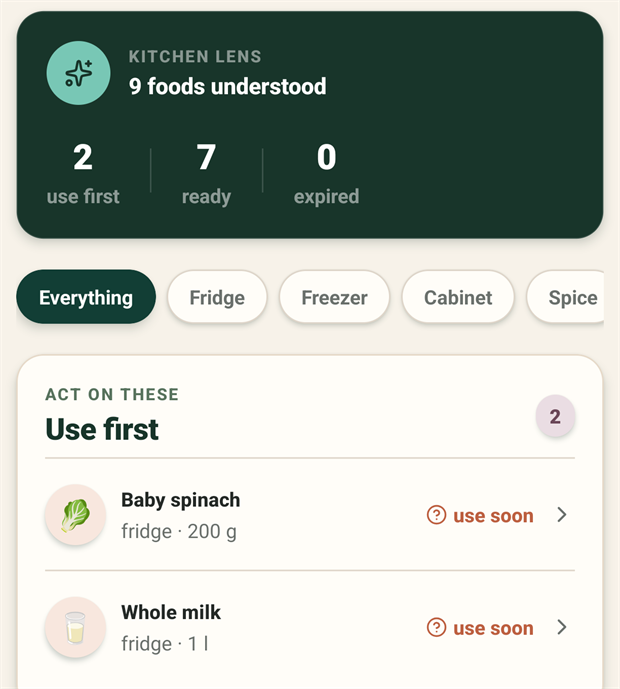
The Kitchen summary card reading 9 foods understood, with counts of 2 use first, 7 ready and 0 expired. Below it, filter chips for Everything, Fridge, Freezer, Cabinet and Spice, then the Use first card listing baby spinach in the fridge at 200 grams and whole milk in the fridge at 1 litre, both marked use soon.
Screen 2.06a The three states, on one screen The counts at the top are the whole idea: 2 to use first, 7 on hand, 0 expired. Tapping a chip filters by where the food is kept rather than by state, so the counts stay the thing you act on.
  • Use first. Approaching its use-by date. Start here when deciding dinner.
  • On hand. Confirmed and not urgent.
  • Expired. Past its date, and needs an honest answer from you.
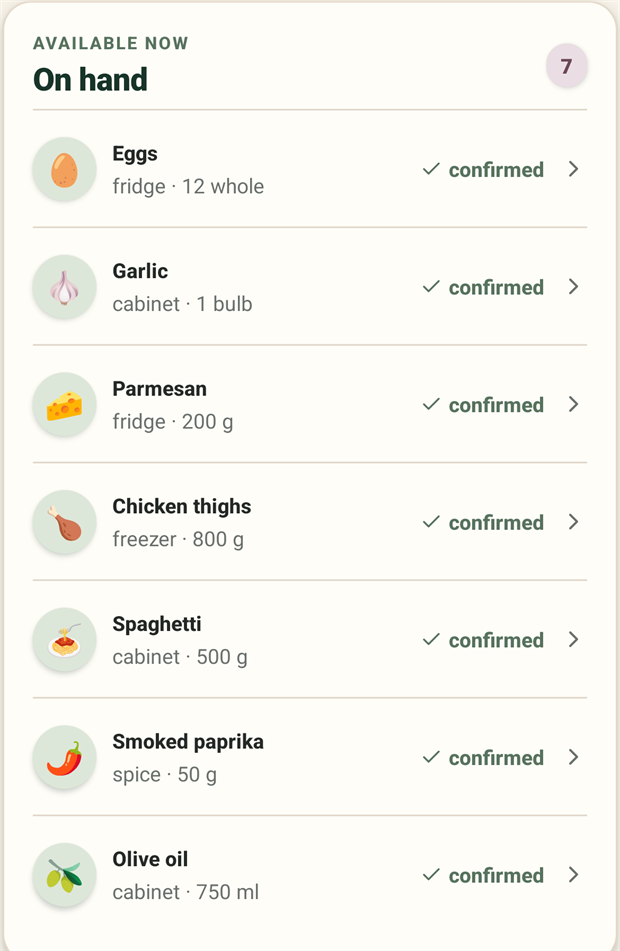
The On hand card, headed Available now with a count of 7. Seven rows: eggs in the fridge at 12 whole, garlic in the cabinet at 1 bulb, parmesan in the fridge at 200 grams, chicken thighs in the freezer at 800 grams, spaghetti in the cabinet at 500 grams, smoked paprika in the spice store at 50 grams, and olive oil in the cabinet at 750 millilitres. Every row is marked confirmed and carries a chevron.
Screen 2.06b On hand, in full These are the seven counted on the card above. Each row carries where it lives and how much is left, which is what lets iWhisk tell you a recipe is ready rather than merely possible. The chevron opens the item to edit it, or to mark it used or tossed.

Tap any item to edit it, or to resolve it as used or tossed.

Please mark tossed food as tossed. It feels like admitting defeat. It is not.

Tossing food never removes progress, never costs you points, and never triggers a lecture. It is how iWhisk learns what you actually get through, so it can stop suggesting the thing you keep throwing away.

2.06.1

Keeping it accurate without it becoming a chore

Two moments do almost all the work: photograph the receipt while unpacking, and record the cook when you finish. Then, roughly weekly, photograph one shelf you have not looked at in a while. Not all of them. One.

When it drifts too far, do not repair it item by item. Photograph the shelf again. The capture is faster than the correction.